Getting Started with YOLOv8 for Object Detection
Introduction to YOLOv8
YOLOv8 is the latest iteration of the YOLO (You Only Look Once) object detection model. It offers improved accuracy and speed compared to previous versions, making it ideal for real-time applications.
YOLOv8 achieves state-of-the-art performance while maintaining real-time inference speeds, making it perfect for edge devices and production environments.
Installation
First, let's install the required dependencies:
pip install ultralytics
pip install opencv-python
pip install numpy
Install YOLOv8 and dependencies
Basic Implementation
Here's a simple example of using YOLOv8 for object detection:
from ultralytics import YOLO
import cv2

# Load the model
model = YOLO(#ce9178;">'yolov8n.pt')

# Load image
image = cv2.imread(#ce9178;">'image.jpg')

# Run inference
results = model(image)

# Display results
for result in results:
    boxes = result.boxes
    for box in boxes:
        x1, y1, x2, y2 = box.xyxy[0]
        confidence = box.conf[0]
        class_id = box.cls[0]

        # Draw bounding box
        cv2.rectangle(image, (int(x1), int(y1)), (int(x2), int(y2)), (0, 255, 0), 2)

cv2.imshow(#ce9178;">'Detection', image)
cv2.waitKey(0)
Basic YOLOv8 object detection implementation
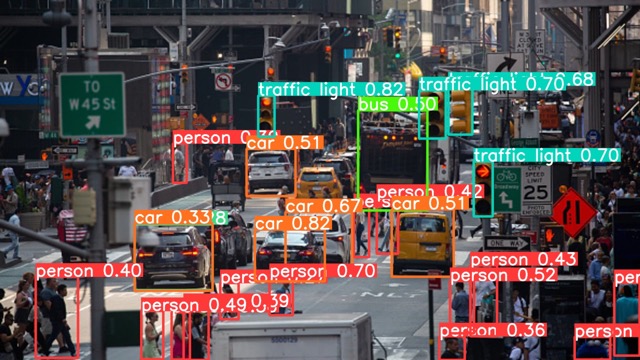
Example of YOLOv8 object detection on a sample image
Video tutorial on YOLOv8 implementation
Conclusion
YOLOv8 provides an excellent balance between accuracy and speed for object detection tasks. With its easy-to-use API and comprehensive documentation, it's a great choice for both beginners and experienced practitioners.